
A Christmas Party Booking Form You Can Copy and Send
"Hi po, we're around 30 to 40 people. Can we have our Christmas party there on December 19?"
That's a good booking. It's also the start of a long chat if you answer one question at a time. By the time you have the details, the organizer may have booked somewhere that replied faster.
Restaurants, event spaces, caterers, salons and photographers all get these messages in December. Below are four you can copy. Change the words in brackets, save each as a reply on Messenger, and send the right one at the right time.
Before you copy anything, decide three things for yourself:
- Your packages. Two or three, with a price per head or a fixed price, a minimum number of guests, and what costs extra (extra hours, corkage, travel outside the city).
- Your deposit. How much it is, and how many days the customer has to pay it.
- Your final count deadline. Usually a few days to a week before the event.
1. The group booking form
When to use it: as your first reply to any group inquiry, before you discuss dates or prices one by one.
Hi! Thank you for considering us for your Christmas party. To check the date and give you an exact quote, please reply with these details:
Date of the event:
Start and end time:
Name of your group or office:
Contact person and mobile number:
Estimated number of guests (a range is fine, like 30 to 40):
Package you're interested in (A, B or C):
Food allergies or special requests:
Anything else we should know (program, sound system, cake, decorations):Our packages:
Package A: [what's included], ₱[price] per head, minimum [number] guests
Package B: [what's included], ₱[price] per head, minimum [number] guests
We can fit up to [number] guests.
A headcount range is normal at this stage. You'll get the real number later with the final-count reminder.
Adjust the form to your business. A salon might ask how many need hair, makeup or both, and what time everyone must be ready. A photographer might ask for the venue and hours of coverage. A caterer will want to know if there's table space for setup.
2. The deposit and cancellation note
When to use it: right after they send the form and pick a package, before you hold the date.
Thank you! [Date] is still open. To hold it for you, we ask for a ₱[amount] deposit, sent within [number] days. After that, the date opens up to other groups.
You can pay by GCash or Maya to [name, number] or by bank transfer to [bank, account name, account number]. Please send a screenshot with the reference number once paid.
The deposit goes toward your final bill. If you cancel on or before [date], we'll refund it in full. If you cancel after that, the deposit is not refundable, because we will have turned away other groups and started buying for your event.
In December, a date held for a group who never pays is a date you can't sell to anyone else. That's why the deadline matters.
Keep the refund rule simple: one cutoff date, refundable before it, not after. If you'd rather let them move to another open date instead, say so here.
When the screenshot comes in, check your own GCash, Maya or bank app before you mark the date as booked. A screenshot alone is not payment. For more on this, see Bogus Buyers and Fake Orders: Warning Signs and What to Do.
3. The booking confirmation
When to use it: once you've seen the deposit in your account. Send it again, updated, any time something changes.
Confirmed! Here are your booking details:
Event: Christmas party for [group name]
Date and time: [Saturday, December 19, 6:00 to 10:00 PM]
Package: [Package B, ₱650 per head]
Estimated guests: [35]
Deposit received: ₱[5,000] on [date], ref. no. [number]
Final headcount due: [Tuesday, December 15]
Balance: payable on the day of the event, based on the final headcount
Special requests: [list them]Please reply "OK" to confirm these details are correct.
This is the message you'll both go back to later, so put everything in it. The "OK" tells you they've read it. If they call to change the time, package or number, send a new confirmation rather than relying on the call.
4. The final-count reminder
When to use it: two or three days before the final count deadline.
Hi [name]! Just a reminder that we need your final headcount for your [December 19] party by [Tuesday, December 15]. We'll prepare food and seats for that number, and your bill will be based on it.
If more people join after that, we can add up to [number] more guests at ₱[price] each, as long as we're told by [date or time].
This step protects you most. If fewer people come, you've already bought and prepared for the final count, and the bill reflects it. It also helps the organizer, who has to chase names around the office.
Keep all your group bookings in one list
Once you have a few going, keep them in one list, separate from daily orders and walk-ins: date, group, package, guests, deposit with its reference number, and final count due.
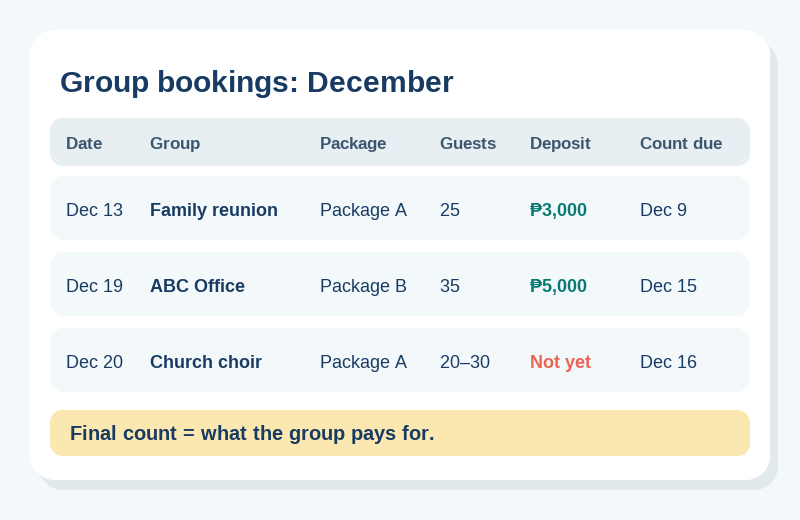
Check it each morning to see who still owes a deposit and whose reminder goes out today. When a date fills up, update your page and saved replies so people aren't left waiting.
For the rest of your December prep, like holiday hours and order cutoffs, see Is Your Business Ready for the Christmas Rush?.
Put your packages where organizers can share them
The person planning an office party is usually comparing a few places and has to show the options to their boss. A website with your group packages, prices, minimums and a booking request form gives them one link to forward instead of a pile of chat screenshots.
DotCity builds a website from the Facebook page you already have. You get a free preview within 48 hours, and your first month is free. After that, the Standard plan is ₱1,499 a month, with no setup fee. Hosting and updates are included, and you can pay by GCash.
- Message us on Messenger for a free preview: https://m.me/dotcity.ph
- Or try our free audit to see what to fix first: https://dotcity.ph/audit