
Is Your Business Ready for the Christmas Rush?

In the Philippines, the Christmas season starts early. By November, people are already asking about gift sets, party trays, December bookings, and whether you deliver before the 24th.
More customers is good news. It also means more messages, more orders to track, and more chances for a mix-up. A customer who orders a cake for December 24 and finds out on December 23 that you stopped taking orders will not come back happy.
Most of the work is planning. If you decide a few things now and write them down where customers can see them, December gets easier for you and for them.
Decide your holiday schedule first
Before you post anything, sit down with your calendar and decide:
- the days you will close, such as December 25 and January 1
- the days you will open late or close early
- any extra days or longer hours you will add
- when your team takes their break
Write it down as a simple list with dates and times. You will copy this same list to your Facebook page, your Google Business Profile, and your website, so it helps to get it right once.
If you are not sure yet about one day, leave it off until you decide. A wrong date causes more trouble than a missing one.
Set order and booking cutoffs
If you sell food, cakes, gifts, or anything made to order, decide the last day you will accept orders for Christmas Eve and New Year's Eve. Do the same for delivery. Couriers get busy in December, so give yourself a few extra days.
If you take appointments, decide how far ahead people must book. Salons, spas, photographers, and caterers often fill up in the second half of December.
Then write the cutoffs in plain words. For example: "Christmas Eve cake orders close on December 18. Orders after that depend on what we have left." Customers can plan around a clear date. They get upset when they only learn the date after it has passed.
Plan what you will offer
Many businesses add something for the season: a gift set, a holiday tray, a party package, or a gift certificate. Keep the list short. Three or four clear choices are easier to make, easier to sell, and easier to explain in a message.
For each one, write down:
- what is included
- the price
- how much notice you need
- whether it can be delivered, and the delivery fee
Gift certificates are worth thinking about if you run a salon, clinic, gym, or restaurant. They help customers who want to give something but don't know what the other person wants. Write the expiry date and what the certificate can be used for on the certificate itself.
Post it in one place, and pin it
Make one post with your holiday hours, your cutoff dates, and your seasonal offers with prices. Use one clear photo or a short list. Pin it to the top of your Facebook page so it stays at the top while newer posts go out.
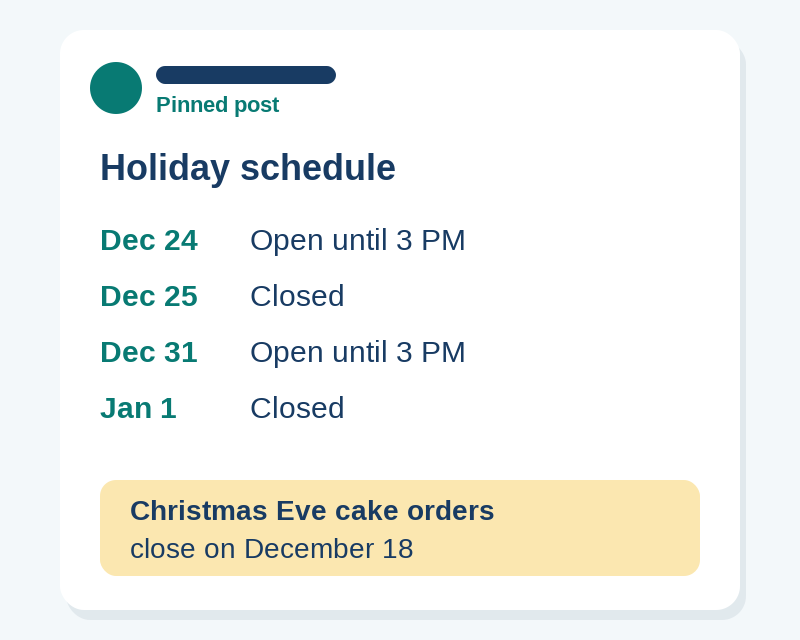
When something changes, edit that post or replace it. Don't post a new schedule without taking the old one down. Two different schedules on the same page confuse people.
Update your hours on Google
Many customers check Google Maps before they go out. Google Business Profile lets you add special hours for specific dates, separate from your regular hours. Add your holiday closures and short days there.
If you skip this step, Google may show you as open on a day you are closed. Someone who travels to your shop on Christmas Day and finds it closed is likely to remember that.
After the holidays, check that your regular hours show again.
Get ready for more messages
In December, the same questions come in many times a day. "Do you still take orders for the 24th?" "Are you open on the 26th?" "How much is the gift set?"
Write short answers to these questions now and save them as saved replies in your page inbox. Update your greeting so it mentions your cutoff dates. We wrote a separate guide on setting these up: Answer Messenger Faster With Replies You Write Once.
Keep one list of every order
When orders come from Messenger, texts, calls, and walk-ins, it is easy to lose one. Use one list for all of them, whether it is a notebook, a spreadsheet, or a whiteboard. For each order, write the name, the item, the date and time, delivery or pickup, and whether it is paid.
If you ask for a deposit, say how much and how to pay it before you confirm the order. Mark each order as paid when the money arrives, not when the customer says they sent it.
Check the list every morning. It shows you what to make or prepare that day, and it shows you when you are full.
Tell people when you are full
When you cannot take more orders for a date, say so on your page and in your saved replies. Update the pinned post. Customers would rather know early than wait for a reply that never comes.
You can offer the next date you have open, or point them to what you have ready in the shop.
After the season
In January, change everything back: your pinned post, your Google hours, your greeting, and your saved replies. Take down the seasonal offers you no longer sell.
Then look at your order list. It shows what sold well, which days were busiest, and which questions came up most. That is useful when you plan for next Christmas.
A website can hold your holiday details too
A website gives customers one page with your hours, your prices, and how to order, without scrolling through your posts. When your holiday schedule changes, it changes in one place.
DotCity builds a website from the Facebook page you already have. You get a free preview within 48 hours. Your first month is free. After that, the Standard plan is ₱1,499 per month, with no setup fee. Hosting and updates are included, and you can pay by GCash.
We are based in Dumaguete City, and we work with small businesses across the Philippines.
- Try the free audit: https://dotcity.ph/audit
- Or message us on Messenger for a free preview: https://m.me/dotcity.ph