
'Ate, What Do I Reply?' Handing Your Page to a Helper This December
Picture Joy, who bakes cakes and leche flan from her home kitchen in Talisay. Joy isn't a real client, but her December will sound familiar to anyone who sells from a Facebook page.
Every year, the messages pile up from late November. Orders for Christmas parties, Noche Buena and New Year come in at all hours, while Joy is up to her elbows in batter. This year her younger cousin Bea is home from college for the holidays. "Ate, I'll answer the page for you," she says. "I'm on my phone all day anyway."
Joy hands over her phone, already logged in, and goes back to the oven.
The first weekend
Bea is quick and polite. Customers get answers in minutes instead of hours. But by Sunday night, Joy finds a few problems.
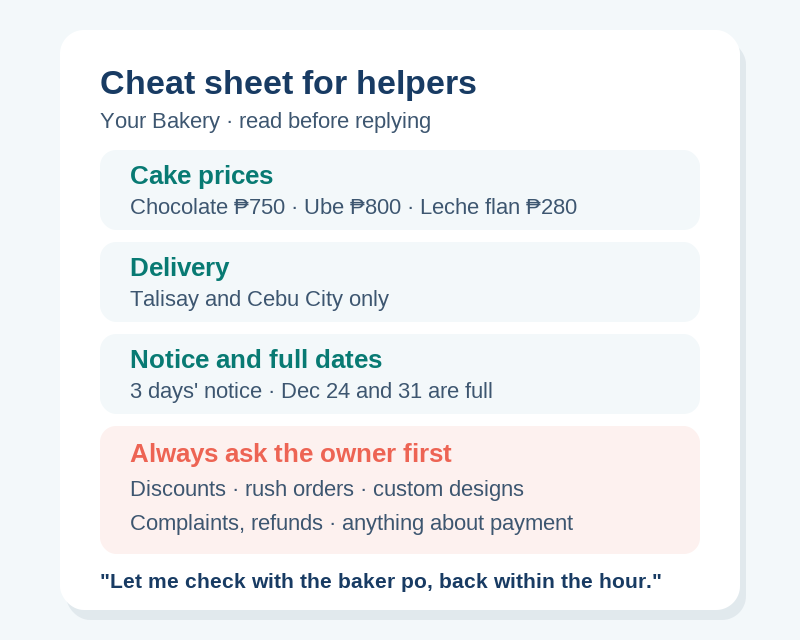
- A customer in Liloan was told "yes po, we deliver," but Joy only delivers within Talisay and Cebu City.
- Someone asked for the price of a chocolate cake, and Bea quoted ₱650 from a post last year. It's ₱750 now.
- A party order for December 24 was confirmed, but the 24th was already full.
- One customer sent a GCash screenshot, and Bea marked the order as paid. Joy hasn't checked her GCash app yet.
None of this is Bea's fault. She answered with what she could find. The prices, rules and limits were all in Joy's head, and Bea couldn't see in there.
Sunday night: writing it all down
Joy sits down with a notebook and writes one page, the things a helper needs to answer most messages without asking her.
- prices for every cake and size
- the places she delivers to, and the fee for each
- how many days' notice she needs
- the dates that are already full
- how customers pay
- what Bea should never promise
Bea types it into a note on her own phone. Joy also saves the most common answers as replies in Messenger, so Bea can send the same wording every time. There's more on setting those up in Answer Messenger Faster With Replies You Write Once.
Her own login, not Joy's phone
Giving Bea her phone meant Bea could also see Joy's personal messages, her GCash notifications and her bank texts. And if Bea logged in somewhere else with Joy's password, that password would be in more places than Joy could keep track of.
So Joy gives Bea access to the page from Bea's own Facebook account. In the page's settings, under page access, she adds Bea with partial access and picks only the tasks Bea needs, like messages and comments. Bea can reply to customers, but she can't change the page, remove Joy or run ads.
When January comes and Bea goes back to school, Joy removes her access in a few taps. For more on keeping your page safe, read Could Your Facebook Page Get Hacked? Six Steps to Lock It Down.
What Bea can say yes to
The next thing Joy decides is where Bea's answers stop. She splits it in two.
Bea can answer on her own:
- prices from the cheat sheet
- delivery areas and fees
- which dates are open
- how to order and how to pay
Bea asks Joy first:
- any discount or special price
- orders with less notice than usual
- custom designs she hasn't seen before
- complaints, refunds and replacements
- anything about a payment
For the second list, Bea uses one simple holding reply: "Thank you po! Let me check with the baker and I'll get back to you within the hour." Then she actually does, because Joy promises to answer Bea quickly.
One order list, and only Joy confirms payment
The December 24 mix-up happened because Bea didn't know which days were full. So Joy moves her orders from a notebook in the kitchen to one shared list they can both see, with the date, the customer's name, the order, and whether it's paid.
Bea can add new orders. But only Joy marks an order as paid, after she sees the money in her own GCash or bank app. A screenshot is not proof that money arrived, and checking it shouldn't be the helper's job.
Five minutes at the end of the day
Each night, before Bea logs off, she sends Joy a short message:
- new orders today
- questions still waiting for an answer
- any customer who was unhappy
- anything she wasn't sure about
It takes five minutes. Joy reads it while the last batch cools, and nothing slips through over the holidays.
What Joy's December teaches
The same steps work for a salon taking on a seasonal receptionist, a clinic with a new front-desk staff member, or a gym where a coach answers the page between classes.
- Write it down before you hand it over. Prices, areas, notice, full dates and payment rules on one page.
- Give them their own access. Use page access with only the tasks they need, not your phone or your password.
- Draw a clear line. List what they can answer and what always comes to you.
- Give them a holding reply. "Let me check and get back to you" is better than a wrong yes.
- Keep one order list. Everyone adds to the same list, so nobody books a full day.
- Keep payments with you. Check your own app before any order is marked paid.
- Ask for a short handover. A few lines each night are enough.
- Remove access when they're done. Do it the day they stop helping.
Give your helper one place to point to
A cheat sheet helps your helper. But customers ask the same questions whether you or your helper is on the page. A website can hold your prices, delivery areas, ordering steps and holiday dates in one place, so anyone answering can send one link instead of typing it all again.
DotCity builds a website from the Facebook page you already have. You get a free preview within 48 hours, and your first month is free. After that, the Standard plan is ₱1,499 a month, with no setup fee. Hosting and updates are included, and you can pay by GCash.
- Message us on Messenger for a free preview: https://m.me/dotcity.ph
- Or try our free audit to see what to fix first: https://dotcity.ph/audit