
Could Your Facebook Page Get Hacked? Six Steps to Lock It Down
A cake seller gets a message on her page: "Your page will be disabled in 24 hours for breaking our rules. Click here to appeal." It looks official. It even has the Meta logo. She clicks, types her password to "verify," and an hour later she can't log in. By evening, her page is posting ads for something she doesn't sell, and her regular customers are messaging to ask what happened.
For many small business owners, the Facebook page is the whole business online: the price list, the reviews, the message history, the customers who order every month. Losing it, even for a few days, hurts. In December, when orders are at their peak, it hurts even more.
Most page takeovers start the same way, and most can be stopped with a few settings and one habit. Here is what to do.
1. Turn on two-factor login
Two-factor login means that a password alone is not enough to get into your account. Facebook also asks for a code from your phone, so someone who steals your password still can't log in.
Turn it on for your personal Facebook account, because that is the account that controls your page. In Facebook, open Accounts Center, then Password and security, then Two-factor authentication. Choose how you want to get your code:
- an authentication app, such as Google Authenticator or Microsoft Authenticator
- a text message to your phone number
- a security key, if you have one
An authentication app is safer than a text message. If you choose text, use a number you will keep.
When you set it up, Facebook gives you recovery codes. Write them on paper and keep them somewhere safe, not in a photo on your phone. If you lose your phone, those codes get you back in.
2. Use a strong password you don't use anywhere else
If your Facebook password is the same as your email password, or the same one you used on an old online shop, then a leak on any of those sites puts your page at risk.
Give Facebook its own password. A few words that mean something to you, plus a number, are easier to remember than random letters. Don't use your business name, birthday or phone number.
Do the same for the email address connected to your Facebook account. Whoever controls that email can reset your Facebook password.
3. Check who has access to your page
Over the years, many people may have been given access to your page: a former staff member, a nephew who helped with posts, a freelancer who ran one promo. Some may still have full control.
Open your page, go to Settings, and look for Page access or Page setup. You will see who has Facebook access and what each person can do.
- Remove anyone who no longer works with you.
- Give staff only the access they need. Someone who answers messages doesn't need full control.
- Keep at least two people you trust with full control, such as you and a business partner or family member. If one account is locked, the other can still manage the page.
Ask everyone who has access to turn on two-factor login too. Your page is only as safe as the weakest account that can manage it.
4. Learn what fake Meta messages look like
Most takeovers don't need any hacking skill. They need you to type your password into the wrong place.
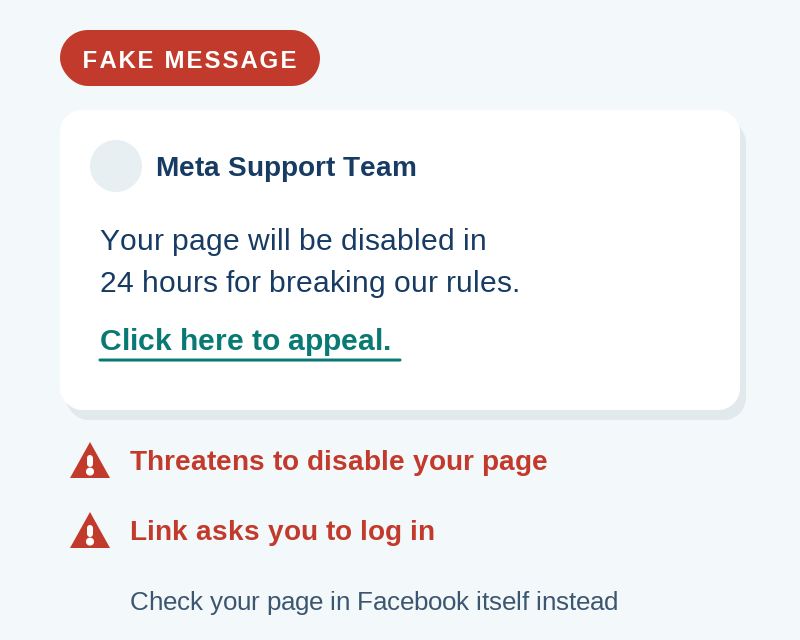
Be careful with any message that:
- says your page will be disabled, deleted or restricted unless you act right away
- claims you broke copyright or community rules, with a link to "appeal"
- offers a blue check, free ad credit or a "verified business" badge
- asks for your password, your login code or your recovery codes
Meta does not send warnings through a random page's Messenger, and it will never ask for your password or login code in a message. If you're worried that something is wrong with your page, don't click the link. Open Facebook yourself and check your page's notifications and account status there.
Teach your staff the same rule: never type a password or login code after clicking a link in a message.
5. Turn on login alerts and check where you're logged in
In Accounts Center, under Password and security, you can turn on alerts for logins from a new device. You can also see every phone and computer that is logged in to your account right now.
Look at that list once a month. If you see a device you don't recognize, log it out and change your password.
6. Keep your details somewhere other than Facebook
Even with all of this, a page can still get locked, and recovery can take days. Your customers need another way to reach you.
Keep a simple backup:
- your customer list, with names and numbers, outside of Messenger
- your current price list and photos saved on your phone or computer
- your phone number and address on your Google Business Profile
We wrote about keeping a customer list in Small Habits That Bring Customers Back.
If your page is taken
Act quickly. The sooner you start, the better your chances.
- Go to facebook.com/hacked from a phone or computer you have used before, and follow the steps.
- If you can still log in, change your password, log out all other devices, and remove anyone from page access you didn't add.
- Change the password of the email connected to your account.
- Tell your customers on your other channels, such as your Google listing, a text to regulars, or a post from a friend's page, that your page was compromised and they shouldn't send money to it.
That last step matters. A stolen page can be used to take orders and collect GCash payments. A quick warning protects your customers and your name.
Have a place that is yours
Facebook is a good place to talk with customers, but it belongs to someone else. A website is a second address that keeps working even if your page is locked. Customers can still find your prices, hours, location and number there.
DotCity builds a website from the Facebook page you already have. You get a free preview within 48 hours, and your first month is free. After that, the Standard plan is ₱1,499 a month, with no setup fee. Hosting and updates are included, and you can pay by GCash.
- Message us on Messenger for a free preview: https://m.me/dotcity.ph
- Or try our free audit to see what to fix first: https://dotcity.ph/audit