
Facebook Captions That Get Customers to Message You
You take a nice photo of your new cake design and post it with the caption "AVAILABLE NA PO!!! PM IS THE KEY!!!" A few people react. One comments "hm?" Nobody orders.
The photo was fine. The caption didn't give people enough to act on. They didn't know the price, the size, the flavor, or how far ahead to order. Most people won't message just to ask. They scroll on.
A caption is the part of your post that turns "nice" into "I want one." Here is how to write captions that get customers to send you a message.
Make the first line count
On Facebook, people usually see only the first line or two of a caption before it is cut off with "See more." That first line decides whether they keep reading.
Put the most useful or interesting part first. Compare:
- "Good morning everyone! Hope you're all having a blessed week!"
- "New: ube cheesecake, 6 inches, ₱650."
The first one tells the reader nothing. The second tells them what it is and how much, before they even tap "See more."
A good first line is usually one of these:
- what's new: "Now open on Sundays."
- the price: "Gel manicure, ₱350 this week."
- a question your customer is already asking: "Aircon not cold anymore?"
- a clear benefit: "Same-day cake orders, if you message before 10 AM."
Say what, how much, where and how to order
Most messages a business gets are basic questions. "How much po?" "Where are you?" "Pwede pa-deliver?" Every one of those is a question the caption could have answered.
A caption that gets orders usually covers four things:
- What it is. Name it the way customers say it. "Haircut and blow-dry," not "Hair Service Package A."
- How much. Put the price. Posts that say "PM for price" make people work for basic information, and many won't bother.
- Where. Your area and a landmark, or where you deliver. "Near the public market in Mandaue" or "We deliver within Cebu City."
- How to order or book. "Message us," "Order by Thursday for Saturday pickup," or "Walk-ins welcome."
You don't need all four in every post. But if a customer would have to message you just to learn one of them, add it.
Give one clear next step
End the caption with one thing for the reader to do. Not three.
"Message us to book" is clear. "Like, share, comment, follow, and PM us for details" asks for so much that people do none of it.
Make the step specific and easy:
- "Message us your preferred date and time."
- "Send 'CAKE' and we'll reply with the flavors."
- "Tap Send Message to reserve a slot."
When you tell people exactly what to send, the first message they send you is already useful. That saves you both time.
Keep lines short
Most of your customers read on their phones. A long block of text looks like work, and people skip it.
Break the caption into short lines, with one idea per line. For example:
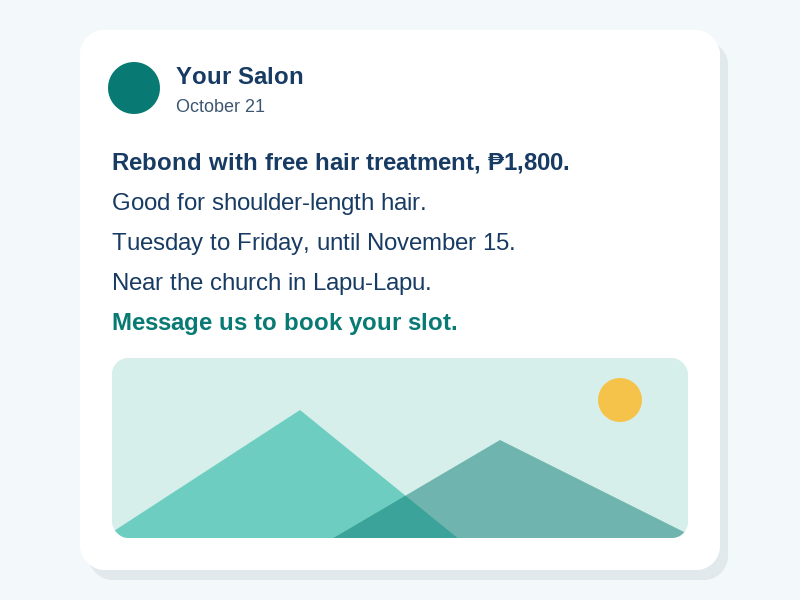
Rebond with free hair treatment, ₱1,800.
Good for shoulder-length hair.
Tuesday to Friday, until November 15.
Near the church in Lapu-Lapu.
Message us to book your slot.
Five lines, each easy to read in a second. A customer can see in a glance if it's for them.
If you have more to say, like your full price list or booking rules, put it in a separate post and pin it, or link to where it is written down. Don't squeeze everything into every caption.
Skip the all-caps and the clutter
ALL CAPS reads like shouting, and it's harder to read on a small screen. Use normal sentences, and save capitals for a single word if you really need it.
A few other things that get in the way:
- Rows of exclamation points. One is plenty.
- Long strings of hashtags. For a local business, they rarely bring in customers. One or two, or none, is fine.
- "PM is the key" or "PM for price." Just say the price.
- Lots of symbols and decorations. They make the words harder to find.
- Old details. If a price or schedule changed, edit old posts or delete them, so customers don't quote you last year's price.
Plain, clear words feel more trustworthy, too. A customer deciding where to bring her child for a checkup or where to order a birthday cake wants a business that seems organized.
Write like you talk to customers
You don't need to sound formal. Write the way you would answer a regular customer at the counter. Taglish or Bisaya is fine if that's how your customers talk. Friendly and clear beats fancy.
Before you post, read the caption once as if you were a stranger. Do you know what it is, how much, where, and what to do next? If yes, post it.
Keep a few templates
You don't have to start from zero every time. Save two or three caption patterns in your phone's notes and fill in the blanks:
[What it is], [price].
[One detail that matters: size, time, who it's for].
[When: dates or days].
[Where: area or delivery].
Message us to [order or book].
It takes a minute to fill in, and every post you write will answer the basic questions.
Let your details live beyond one post
Even the best caption gets buried under newer posts within days. A website keeps your prices, location, hours and how to order in one place that's easy to find, so a customer who sees an old post can still check the details before messaging you. If you're wondering whether that's worth it, read Do I Still Need a Website If My Business Is on Facebook?
DotCity builds a website from the Facebook page you already have. You get a free preview within 48 hours, and your first month is free. After that, the Standard plan is ₱1,499 a month, with no setup fee. Hosting and updates are included, and you can pay by GCash.
- Message us on Messenger for a free preview: https://m.me/dotcity.ph
- Or try our free audit to see what to fix first: https://dotcity.ph/audit