
Write Your FAQ Once, Answer Fewer Messages
It's 9 PM and your phone buzzes again. "Hi po, how much is a haircut?" Then, "Open po kayo bukas?" Then, "Where are you located?" You answered the same three questions this morning, and yesterday, and the day before.
Every business gets the same questions over and over. A cake seller is asked how many days ahead to order. An aircon cleaning service is asked how long the job takes. A clinic is asked if they accept walk-ins.
An FAQ, short for "frequently asked questions," is a list of those questions with your answers. It saves you time, and it helps customers decide faster, even when you're busy or asleep. Here is how to write one that people will actually use.
Collect the real questions
Don't guess what customers want to know. Look at what they already ask.
Spend 15 minutes scrolling through your Messenger inbox and your page comments from the last month. Write down every question you see, in the customer's own words. You'll notice the same ones come up again and again.
Also ask the people who talk to customers every day. Your cashier, receptionist or delivery rider hears questions you might not.
Most small businesses end up with questions like these:
- How much is it?
- What are your hours?
- Where are you, and is there parking?
- Do I need to book, or can I walk in?
- How do I pay? Do you accept GCash?
- Do you deliver, and how much is the fee?
- How long does it take?
- What if I need to cancel or change my booking?
You don't need 40 questions. Ten to fifteen good ones are enough for most businesses.
Write short, clear answers
A customer reading on a phone wants the answer in the first line. Start with yes, no, or the number. Then add one or two sentences if needed.
Compare these two answers to "Do you accept walk-ins?"
"We value all our customers and try our best to accommodate everyone, but since we sometimes get busy, especially on weekends..."
"Yes, but booked customers go first. To be sure of a slot on weekends, message us a day ahead."
The second one answers the question right away. Write like you're talking to a customer at the counter.
A few more tips:
- Give real numbers. "Haircut starts at ₱250" is better than "Affordable prices." If prices vary, give a range and say what changes it.
- Use the words customers use. If people ask "Do you have GCash?", write the question that way.
- One question, one answer. Don't put hours, location and parking in the same answer. Split them up so they're easy to scan.
- Be honest about limits. If you don't deliver outside the city, say so. It saves both of you time.
Put the most-asked questions first
Order matters. Most people read the first few questions and stop.
Look back at your list and count which questions came up most. Those go at the top. For most businesses, that means price, hours, location and how to book or order.
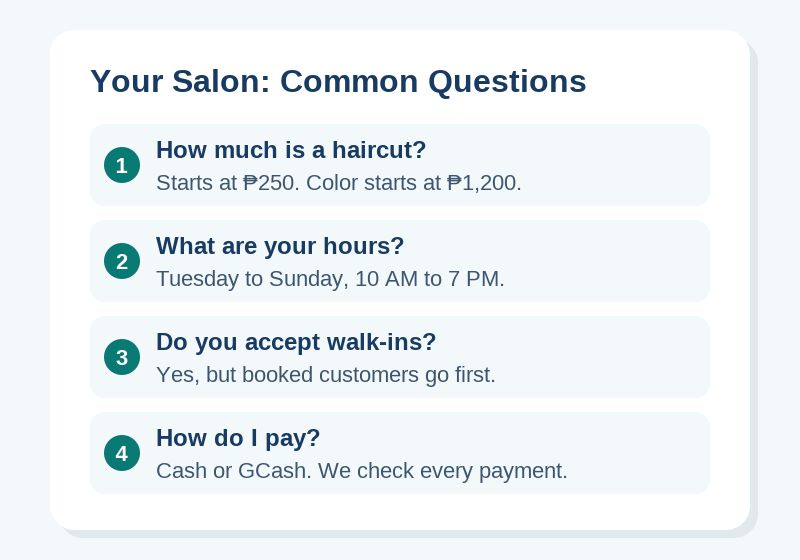
If your list gets long, group the questions under simple headings, like "Booking," "Payment" and "Delivery." That way a customer can jump to the part they care about.
Put it where customers will see it
An FAQ only helps if people find it before they message you. Put it in more than one place.
A pinned post on your Facebook page. Write the FAQ as one post and pin it to the top of your page. New visitors see it first. Add a clear first line, like "Answers to our most common questions," so people know what it is.
Your saved replies in Messenger. Turn your top answers into saved replies. When someone asks about prices, you tap once and send the full answer. Some pages also let you set up suggested questions that people can tap when they first open a chat.
Your page's About section. Make sure your hours, address, phone number and price range are filled in. These answer the most common questions without any extra work.
Your website. If you have one, give the FAQ its own section or page. People who search on Google for "salon open Sunday near me" can find the answer there, even if they've never seen your Facebook page. We explain more about this in Do I Still Need a Website If My Business Is on Facebook?
Keep it updated
An old FAQ is worse than no FAQ. If it says the haircut is ₱250 and you now charge ₱300, you'll have an awkward conversation at the counter.
Set a simple routine:
- Check it once a month. Read every answer and fix anything that changed: prices, hours, payment options, delivery areas.
- Update it before busy seasons. Christmas is coming. If your hours, cut-off dates for orders or booking rules change in December, add that now, not on December 20.
- Add new questions as they come up. If three people ask the same new question in a week, it belongs on the list.
- Remove what no one asks. A shorter list is easier to read.
When you change something, update every place the FAQ appears: the pinned post, the saved replies and the website. It helps to keep one main copy on your phone and update the others from it.
A simple place for your answers
A pinned post can get buried, and saved replies only work once someone messages you. A website keeps your prices, hours, location and FAQ in one place that's always easy to find, and people can see it when they search on Google.
DotCity builds a website from the Facebook page you already have. You get a free preview within 48 hours, and your first month is free. After that, the Standard plan is ₱1,499 a month, with no setup fee. Hosting and updates are included, and you can pay by GCash.
- Message us on Messenger for a free preview: https://m.me/dotcity.ph
- Or try our free audit to see what to fix first: https://dotcity.ph/audit