
A Price List Customers Can Understand at a Glance
A customer sees your post about rebond and messages, "HM po?" You reply, "Starts at ₱1,500." She comes in with hair down to her waist, and the final bill is ₱3,200. She pays, but she doesn't look happy, and she doesn't come back.
Nobody lied. The price really does start at ₱1,500. But the customer didn't know what "starts at" meant for her hair, and that surprise at the counter cost you a regular.
A good price list stops that from happening. It also saves you from answering the same question all day. Here is how to write one that customers understand the first time.
Start with what people ask about most
You don't need to list every single thing you do on day one. Start with the services or products people ask about most often. For a salon, that might be haircuts, color, rebond and treatments. For a clinic, consultation, cleaning and extraction. For a cake seller, your regular sizes and flavors.
Group them under simple headings, such as "Hair," "Nails" and "Packages." Customers scan a list. Headings help them find their part fast.
Explain what "starts at" means
"Starts at" is fine. Many services really do depend on the customer. The problem is when the customer can't tell what moves the price up.
So say it. Right under the price, add what the price depends on:
- "Rebond from ₱1,500. Final price depends on hair length and thickness."
- "Aircon cleaning from ₱800. Price depends on unit type and size."
- "Custom cakes from ₱1,200. Price depends on size and design."
Better still, show the steps. That is where tiers come in.
Use tiers for size and length
When the price depends on one thing, such as hair length or cake size, show each level with its own price. Customers can find their own price without asking.
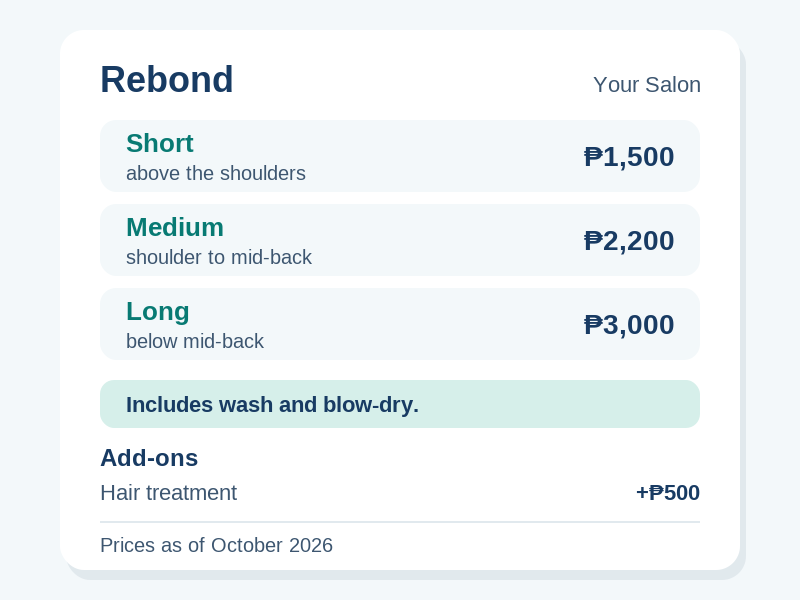
For a salon, the easy way is to use hair length. Describe each level in words people can check in a mirror:
- Short (above the shoulders): ₱1,500
- Medium (shoulder to mid-back): ₱2,200
- Long (below mid-back): ₱3,000
A cake seller can do the same with sizes: 6-inch, 8-inch and 10-inch, each with a price and how many people it serves. An aircon cleaner can list window type, split type and floor-mounted.
Say what is included
Two salons can both charge ₱2,200 for rebond and give very different services. One includes a wash, blow-dry and a take-home treatment. The other doesn't. Customers don't know which one you are unless you tell them.
Add one short line under each service:
- "Includes wash and blow-dry."
- "Includes consultation and cleaning. X-ray not included."
- "Includes one message on the cake. Toppers extra."
This also protects you. If a customer says, "I thought the treatment was included," you can point to the list.
List add-ons separately
Add-ons are the small extras that change the total: a hair treatment, a longer massage, a cake topper, delivery, a second aircon unit. Put them in their own short section with their own prices.
That way, the main price stays simple, and the customer can add things on purpose instead of being surprised.
Make packages easy to compare
Packages work well for events and regular visits: a bridal package, a gym's three-month membership, a party cake set. Write each package as a short list of what's in it, with one total price.
If a package saves the customer money, you can show it plainly, for example, "₱4,500 (₱600 less than booking separately)." Only say this if the numbers are true.
Keep it to two or three packages. Too many choices make people stop and ask, which is what you were trying to avoid.
Post it as an image and as text
Most owners post their price list as a nice image. That's good for the feed. But an image has limits. Customers can't copy a line from it. Search engines can't read it well. And on a small phone, tiny text in a picture is hard to read.
So post both:
- An image with large, clear text, for your Facebook posts, your Messenger replies and your counter.
- The same list as text, in the post caption or in a saved reply, so people can read and copy it.
Use the same prices and the same wording in both. Then pin the post to the top of your Facebook page so it doesn't get buried.
Keep it current
An old price list is worse than none. If a customer screenshots last year's prices and shows them at the counter, you either take the loss or start an argument.
A few simple habits help:
- Put a date on the list, such as "Prices as of October 2026."
- When a price changes, update every copy on the same day: the pinned post, the saved reply, the counter sign, and your Google profile if you list prices there.
- Delete or edit old price posts so they don't show up in searches on your page.
- Before the Christmas rush, check the list once more, since many businesses adjust prices or add holiday packages around then.
Show it to someone before you post
Before you post, show the list to a friend who doesn't know your business. Ask them, "How much would this cost for you?" If they can't answer without asking you a question, rewrite that line.
A website keeps one clear price list
On Facebook, even a pinned price list can get lost, and old versions stay in the feed. A simple website holds one current price list that customers can open anytime, next to your hours, location and a way to book. We wrote about this in Do I Still Need a Website If My Business Is on Facebook?
DotCity builds a website from the Facebook page you already have. You get a free preview within 48 hours, and your first month is free. After that, the Standard plan is ₱1,499 a month, with no setup fee. Hosting and updates are included, and you can pay by GCash.
- Message us on Messenger for a free preview: https://m.me/dotcity.ph
- Or try our free audit to see what to fix first: https://dotcity.ph/audit