
5 Myths That Keep Small Businesses From Making Videos
Other businesses post short videos, and people seem to love them. A barber finishing a fade. A cake getting its last strawberry. An aircon technician pulling out a filter so dusty it looks gray. The comments fill up with "Where is this po?" and "How much?"
Then you think about doing it yourself, and the reasons pile up. No time. No equipment. Nothing interesting to show.
Most of those reasons come from a few common beliefs about video. Here are five, and what to do instead.
1. "I need a good camera and editing skills"
The phone in your pocket is enough. What makes a phone video look good isn't the phone. It's a few small habits.
- Hold the phone upright. Most people watch short videos on a phone held vertically, so a vertical video fills the whole screen.
- Keep it steady. Lean your elbows on a table, prop the phone against a jar or a stack of books, or buy a cheap phone stand. Shaky video is hard to watch.
- Wipe the lens first. A smudged lens makes everything look cloudy.
- Find good light. Film near a window during the day, with the light falling on your work, not behind it. If you stand in front of a bright window, you'll look like a dark shape. If your yellow lights make colors look strange, turn them off. If your shop is dim, film in the brightest corner or step outside for a few seconds.
As for editing, the app you post with lets you trim, add text and add music. That covers most of what you need.
2. "My business is too boring to film"
Owners say this all the time, and it's almost never true. The work you do every day without thinking is new to your customers. They've never seen how a rebond is done, or what's inside their aircon, or how you pack an order.
Most useful business videos fall into one of four types. Pick one and start there.
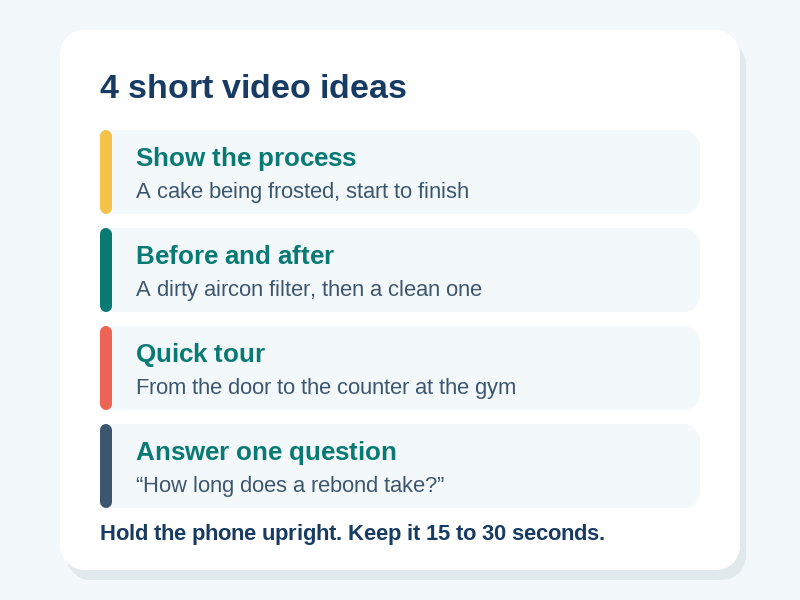
Show the process. People like watching something get made or fixed. A salon can film a blow-dry, sped up. A cake seller can film the frosting going on. A shoe cleaner can film the brush going over a dirty sneaker.
Show a before and after. This works for almost any service. Messy hair, then the finished cut. A stained car seat, then a clean one. Film the "before" first, so you don't forget it once the job starts.
Give a quick tour. New customers want to know what your place looks like before they visit. Walk slowly from the door to the counter, or around your gym, or through your clinic's waiting area. It helps people feel comfortable coming in for the first time.
Answer one question. Take a question you get every day and answer it on camera. "How long does a rebond take?" "Do you accept walk-ins?" "How do I order?"
3. "Videos have to be long to explain everything"
A short video should show one thing. Not your whole menu, not every service. One haircut, one cake, one room, one answer.
Fifteen to thirty seconds is a good length to aim for. It's long enough to show something real and short enough that people watch to the end. If your video runs longer, look for what you can cut. Usually it's the slow start.
Skip the "Hello, welcome to our shop." Open with the most interesting moment: the dusty filter, the finished cake, the hair before the cut. The first few seconds decide whether people keep watching.
4. "I have to talk on camera"
You don't. Many good business videos show only hands and the work. A cake being decorated doesn't need a voice.
In fact, many people watch with the sound off, in a jeepney, at work or late at night. So your video should make sense without sound anyway.
- Add a few words of text. "Before." "After." "Haircut ₱250." The app you post with lets you put text on the screen.
- If you do talk, speak close to the phone in a quiet spot. Turn off the electric fan if you can. A noisy background is worse than no voice at all.
- Use music from inside the app you post with. Songs you add on your own may get muted or blocked.
One more rule: always ask before you film customers, and don't show anyone's face without their okay.
5. "If one video doesn't get many views, it didn't work"
One video rarely changes much. What helps is showing up regularly, so people get used to seeing your business and remember you when they need you.
Start with one short video a week. Pick a day, say every Wednesday, and stick to it. When you finish a job, take one minute to film the result. In a month you'll have four or five videos, and the next one will feel much easier.
Give each video a short caption that says what it is and what to do next:
Before and after: aircon cleaning in Mandaue. Same-week schedules available. Message us to book.
Add your price if you can. People who see a price and a clear way to book are more likely to message you.
And keep your best videos. A video doesn't stop being useful after a few days. You can post it again later, use it in Stories, or send it in Messenger when a customer asks, "What does it look like po?"
Give your best videos a home
On Facebook, even a good video gets buried in your feed after a few days. A simple website can keep your best ones on your services page, next to your prices and booking details, where every new customer sees them. We explain more in Do I Still Need a Website If My Business Is on Facebook?
DotCity builds a website from the Facebook page you already have. You get a free preview within 48 hours, and your first month is free. After that, the Standard plan is ₱1,499 a month, with no setup fee. Hosting and updates are included, and you can pay by GCash.
- Message us on Messenger for a free preview: https://m.me/dotcity.ph
- Or try our free audit to see what to fix first: https://dotcity.ph/audit