
Choosing a Domain Name Customers Can Say Over the Phone
A customer calls your clinic and asks for your website. You start to say it: "It's www dot... ah, the name of the clinic, then dash, then Cebu, then the number two, dot com." There is a pause. "Can you just send it?"
Your domain name is the address of your website, like yourbusiness.com. It goes on your signs, receipts and calling cards, and you will say it out loud many times. A good one is easy to remember and hard to get wrong.
Here is how to pick a good one and keep it safe.
Start with your business name
The simplest domain is your business name, exactly as customers know it. If people know your salon as "Your Salon," then yoursalon.com or yoursalon.ph is a natural choice.
If your business name is long, think about what people actually say. A shop registered as "Santos Family General Merchandise and Hardware" might be known on the street as "Santos Hardware." Use the name people use.
If your exact name is taken, try adding your town or what you do:
- yoursaloncebu.com
- yourhardwaremandaue.ph
- youraircontalisay.com
Adding the place also helps customers know they have the right business.
Keep it short and easy to say over the phone
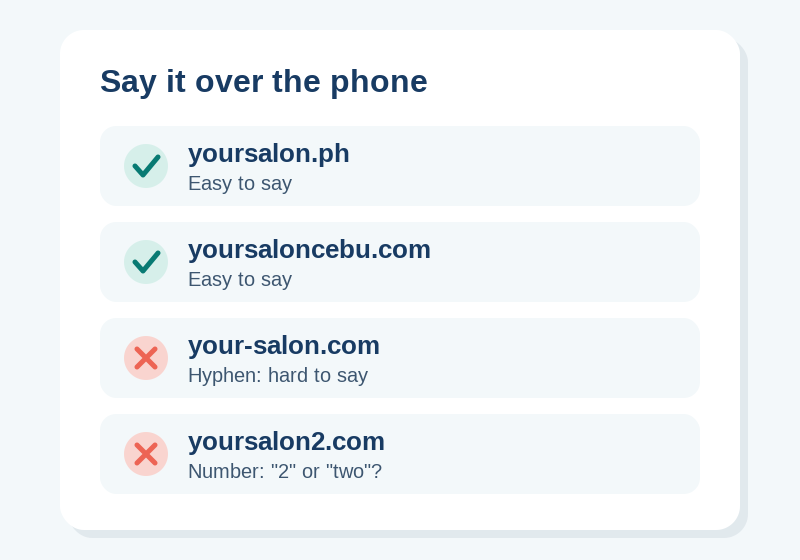
Before you decide, try the phone test. Say the domain out loud to a friend, once, and ask them to type it. If they get it right on the first try, it is a good name.
Things that fail the phone test:
- Hyphens. "Your dash salon dot com" is easy to forget. Many people will type yoursalon.com and end up somewhere else.
- Numbers. Is it "2" or "two"? "4" or "for"? Customers have to guess.
- Odd spellings. If your shop is "Kutz" instead of "Cuts," customers will type it the normal way.
- Double letters at the joins. A name like "salonnails" is easy to mistype with one "n."
Shorter is better, but clear matters more than short. yoursaloncebu.com is longer than a three-letter abbreviation, but far easier to remember.
.com or .ph?
The last part of a domain, like .com or .ph, is called the ending. For a small business in the Philippines, the two common choices are .com and .ph.
- .com is the one most people know. Many customers type .com by habit, even when you tell them something else.
- .ph is the Philippine ending. It tells people right away that you are a local business, and short names are sometimes easier to find with .ph because fewer are taken.
Either one is fine. What matters most is that it is easy to say and that you use the same one everywhere. If you can, register both and point one to the other. That way, a customer who types the wrong ending still reaches you.
Prices for each ending vary by registrar and change over time, so compare a few before you pay. Check the renewal price too, not only the first-year price.
Check that the name is free to use
Before you register, search the name in a domain registrar's search box to see if it is available. Then do two more quick checks:
- Search the name on Facebook and Google. If another business in your area uses something very similar, customers may confuse the two.
- Avoid names that copy a big brand or another shop's name.
Register it in your own name and keep the login
This is the most important step, and the one many owners skip.
The domain should be registered to you or to your business, not to the person who built your website, a relative who "knows computers," or a staff member who has since left. Whoever is named on the registration controls the domain.
When you register, or when someone registers it for you:
- Make sure the registrant name is you or your business.
- Use an email address you own and check, not a web designer's email.
- Keep the login for the registrar account in a safe place, such as a notebook you keep at home or a password manager.
- Turn on two-step login if the registrar offers it.
If someone else already registered your domain for you, ask them for the login details now, while things are friendly. It is much harder to get later.
A web designer can still manage the technical side. You can give them access when they need it. But the domain itself should stay yours, so you can move your website to someone else if you ever want to.
Don't let it expire
Domains are rented, not bought forever. You pay for one year or more at a time, and then you renew.
If you forget to renew, your website and any email on that domain stop working. After a while, the domain can be released, and someone else can register it. Some people buy expired business domains and ask the old owner to buy them back.
To avoid this:
- Turn on auto-renew in your registrar account, if it is offered.
- Keep the payment method on file up to date. An expired card is a common reason renewals fail.
- Put the renewal date in your phone calendar with a reminder a month ahead.
- Make sure the registrar's emails go to an inbox you actually read, so renewal notices don't get missed.
Put your domain to work
A domain on its own is just an address. It becomes useful when it opens a website with your prices, hours, map and a way to message you. Print it on your signs and receipts, and add it to your Facebook page and your Google listing so customers find the same place everywhere. If you are still deciding whether you need a site at all, we wrote about it in Do I Still Need a Website If My Business Is on Facebook?.
DotCity builds a website from the Facebook page you already have. You get a free preview within 48 hours, and your first month is free. After that, the Standard plan is ₱1,499 a month, with no setup fee. Hosting and updates are included, and you can pay by GCash.
- Message us on Messenger for a free preview: https://m.me/dotcity.ph
- Or try our free audit to see what to fix first: https://dotcity.ph/audit