
What to Tell Customers When Bad Weather Closes Your Shop
It's 6 in the morning and the rain hasn't stopped since last night. The street outside is starting to flood. Your staff are texting you: "Ma'am, open po ba tayo today?"
At the same time, a customer has a 10 AM booking for a haircut. Another one ordered a cake for pickup at noon. And someone else is about to leave the house to visit your shop, because your page still says you're open.
You can't control the storm. But you can control how clearly you tell people what's happening.
Safety comes first
Before anything else: if it isn't safe for your staff to travel, or for customers to come, close. A lost day of sales is better than someone getting hurt on the way to work.
Follow the warnings from PAGASA and your local government. If your area has been told to stay home, or the roads to your shop are flooded, the decision is made for you.
Decide early, and set a time to decide
The hardest part is often waiting. "Let's see how it looks at 9." Meanwhile, staff are already on the road and customers are getting ready.
Pick a time to decide, the night before if a storm is expected, or by 6 or 7 in the morning at the latest. Tell your staff that time ahead of the rainy season, so they know when to check for your message.
Decide what you are doing for the whole day:
- Closed for the day. The simplest and clearest choice.
- Opening late. Only if you're fairly sure the weather will clear. Give a time, such as "We'll open at 1 PM if the rain stops. We'll post an update by 11 AM."
- Open, but no deliveries. Useful for a food seller or shop with walk-in customers nearby.
Try not to change your answer three times in one morning.
Post one clear message and pin it
Once you decide, post it on your Facebook page right away. Keep it short and put the important part first.
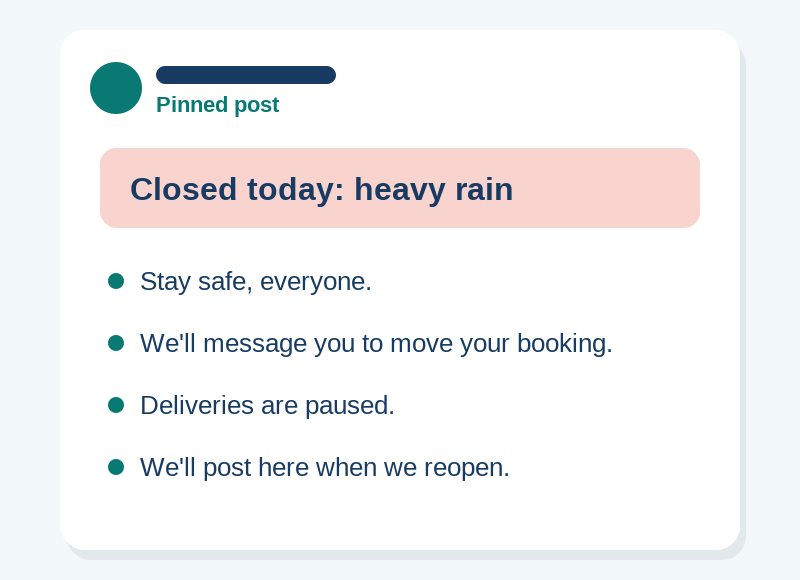
For example:
"CLOSED TODAY, Tuesday, due to heavy rain and flooding. Stay safe, everyone. If you have a booking today, we'll message you to move it. Deliveries are paused. We'll post here when we reopen."
Pin it to the top of your page. A post that's three posts down won't be seen by someone checking quickly before they leave the house.
If you're also on Google Maps, update your hours there for that day too. A Google Business Profile lets you set special hours for a single date, and you can mark it as closed. Then someone who checks Google before heading out won't see "Open now."
Turn on an away message
People will still message you. Set an away message in your Facebook page's inbox settings so everyone gets a reply right away:
"Hi! We're closed today because of the weather. If you have a booking or order, we'll message you to move it. Please stay safe, and see our pinned post for updates."
Remember to turn it off when you reopen. An away message left on for a week makes it look like you've closed for good.
Move your bookings one by one
A general post is not enough for people who already booked. Message each of them directly. They planned their day around you, and they'll appreciate hearing from you first.
Send each person a short message:
"Hi Ana, sorry, we're closed today because of the flooding. Can we move your haircut to Thursday at 10 AM, or would another day be better?"
Offer one specific new time. It's faster than "When are you free?" and most people will just say yes.
If anyone paid a deposit, tell them clearly that it carries over to the new date. That's one less thing for them to worry about.
A clinic should contact patients with urgent concerns first.
Pause deliveries clearly
If you deliver, the weather affects your riders too. Riders from Lalamove, GrabExpress or other services may not be available, or may take much longer than usual.
Tell customers with pending orders what will happen:
- Will the order go out later today, tomorrow, or on a date you'll confirm?
- If it's food or a cake that can't wait, can they cancel or get a refund?
Be honest about what you don't know. "We'll deliver as soon as the roads are clear, and we'll message you before we send it" is better than promising a time you can't keep.
Post when you reopen
If you don't say you're back, some customers will assume you're still closed.
When you reopen, post again:
"We're open again today from 9 AM. Thank you for your patience. If your booking was moved, see you at your new time."
Unpin the closed post, pin the new one for a day, and update your hours on Google if you changed them. Turn off the away message.
Prepare before the next storm
The best time to plan for a typhoon day is on a sunny one. Take ten minutes this week to:
- write your "closed" post, away message and reopening post, and save them on your phone
- agree with staff on what time you'll decide, and where you'll tell them
- keep your booking list somewhere you can open from home, not only at the counter
Then you only need to fill in the day.
Give customers one place to check
During a storm, customers want a quick answer: are you open or not? A website can show your hours, your contact details and a short notice at the top when you're closed, in a place that doesn't get buried under other posts.
DotCity builds a website from the Facebook page you already have. You get a free preview within 48 hours, and your first month is free. After that, the Standard plan is ₱1,499 a month, with no setup fee. Hosting and updates are included, and you can pay by GCash.
- Message us on Messenger for a free preview: https://m.me/dotcity.ph
- Or try our free audit to see what to fix first: https://dotcity.ph/audit