
Better Business Photos With the Phone You Already Have

Customers decide a lot from your photos. A dark, blurry photo of a cake makes people wonder about the cake. A bright, clear photo of the same cake makes them want to order it.
You don't need an expensive camera for this. The phone in your pocket is enough. Most bad business photos have the same few problems, and each one is easy to fix.
Wipe the lens first
Your phone lens collects fingerprints and dust from your pocket, your bag and your hands. A dirty lens makes every photo look soft and hazy, even in good light.
Before you take photos, wipe the lens with a clean, soft cloth. A cotton shirt works. It takes two seconds and it fixes more photos than any app.
Use daylight from a window or a door
Light matters more than the phone. Indoor bulbs often make food look yellow and make skin look gray. The phone flash makes shiny spots and hard shadows.
Turn off the flash. Take your photos in the daytime, near a window or an open door. Put the product so the light falls on the front of it, not behind it. If the window is behind your product, the product turns dark and the background turns white.
Direct noon sun can be too strong. If the shadows are very dark, move a little away from the window, or take the photo in the morning or late afternoon.
Clear the background
Look at everything around the thing you're taking a photo of. A plastic bag, a phone charger, a rag on the counter or a pile of boxes pulls the eye away from your product.
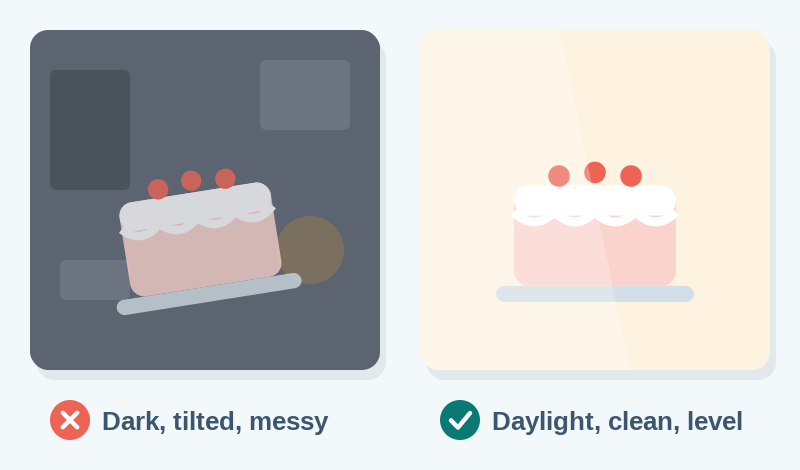
Move the clutter out of the frame. A plain table, a clean wall or a piece of white cardboard makes a good background. For food, a clean plate on a plain table is enough.
Hold the phone steady and tap to focus
Blur usually comes from a moving hand. Hold the phone with both hands, keep your elbows close to your body, and breathe out before you tap the button.
Tap the screen on your product before you take the photo. The phone focuses on the spot you tap and sets the brightness for it. If the photo still looks too dark or too bright, most phones let you slide the brightness up or down after you tap.
Take three or four photos each time, then keep the sharpest one.
Shoot the way a customer sees it
Take photos from the angle a customer would see your product. A plate of food looks good from the top or from where a person sits. A dress looks better on a person or a hanger than folded on a bed. A salon cut looks best from the side and the back.
Show the size when it matters. Put a cake next to a cup, or hold a small product in your hand. Customers who know the size before they order are less likely to be disappointed.
Go easy on filters
Heavy filters change the color of your product. If a customer orders a pink cake and the photo made it look red, they won't be happy when it arrives.
If you edit, keep it simple. Fix the brightness, straighten the photo and crop out anything that doesn't belong. Leave the colors close to real life.
Take the photos customers ask for
Some photos answer questions before people message you. Make sure you have these:
- the front of your shop, so people know what to look for when they arrive
- your best-selling products or services, one clear photo each
- your price board or menu, straight on and easy to read
- you or your team at work, if customers will meet you
- the inside of your shop, if people will sit, wait or eat there
Take new ones when something changes. A new sign, a new menu or a new branch needs a new photo.
Use the same photos everywhere
Once you have a set of good photos, use them on your Facebook page, your Google Business Profile and your website. Customers who see the same shop front and the same products in each place know they found the right business.
When you're ready for a website
At DotCity, we build a website from the Facebook page you already have, including the photos you post there. If you have newer or better photos, send them to us and we use those instead.
You get a free preview within 48 hours. Your first month is free. After that, the Standard plan is ₱1,499 per month, with no setup fee. Hosting and updates are included, and you can pay by GCash.
We are based in Dumaguete City, and we work with small businesses across the Philippines.
- Try the free audit: https://dotcity.ph/audit
- Or message us on Messenger for a free preview: https://m.me/dotcity.ph