
Make Paying You the Easiest Part of the Sale
A customer has picked what they want. They message you, "How do I pay?" Then they wait for your reply.
If they wait too long, some of them change their mind or buy somewhere else. The order was almost done, and it slipped away at the last step.
Paying should be the easiest part of buying from you. Here is how to set that up, and how to protect yourself from fake payments while you do it.
1. Decide which payment options you accept
Pick the ways you are happy to be paid, and stick to them. For most small businesses in the Philippines, that means some of these:
- cash, for walk-in customers and pickups
- GCash or Maya
- bank transfer
- cash on delivery, if you deliver
You don't need to offer everything. Two or three options that you check every day are better than six that you forget about.
2. Post your payment options where customers look
Customers should not have to message you just to find out how to pay. Put your payment options in the places they already check:
- the intro or "About" section of your Facebook page
- a pinned post, next to your prices or menu
- your Google Business Profile, if you have one
- a printed sign at your counter
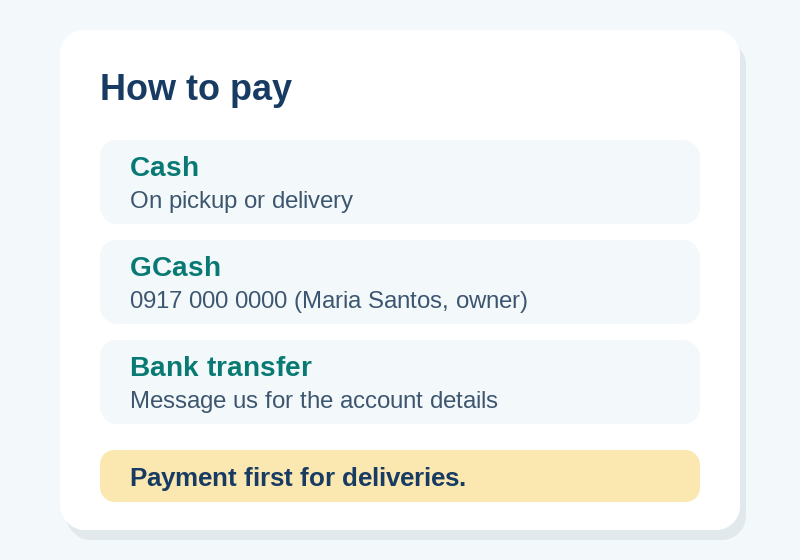
Keep the wording short, for example: "We accept cash, GCash and bank transfer. Payment first for deliveries."
3. Make your GCash details clear
If you accept GCash, make it easy to send money to the right person.
- Use one number for payments, and use the same number everywhere you post it.
- Make sure the name on the account is easy to match to your business. If the account is under your own name, say so: "GCash: 0917 000 0000 (Maria Santos, owner)."
- If you have a GCash QR code, save it as a photo you can send in one tap, and print it for your counter.
When a customer sees a name they don't expect, they get worried that they are sending money to the wrong person. A short note like the one above answers that question before they ask it.
4. Save a reply with your payment steps
You probably explain how to pay many times a day. Write it once and save it as a saved reply on Messenger.
A good payment reply has four parts:
- the total amount
- where to send it (your GCash number, QR code, or bank details)
- what to send back, such as a screenshot of the receipt
- what happens next, for example "We ship the next morning" or "Your order is ready for pickup at 3 PM"
The last part matters. Customers feel better about paying when they know what happens after.
5. Check every payment in your own app
This is the step many busy owners skip. A screenshot from a customer is not proof that the money arrived. Screenshots can be edited, reused, or sent by mistake.
Before you release an order, open your own GCash, Maya or bank app and check that the payment is there, with the right amount. It takes less than a minute. If your staff handle orders, make this a rule for everyone, not only for big orders.
If a payment does not show up, reply politely: "We can't see the payment on our side yet. Can you check the reference number?" Most of the time it is a delay or a typo, not a scam. Either way, you only send the order after the money is in your account.
6. Send a simple receipt
After you confirm a payment, send a short message back: what they paid, the amount, and the date. A photo of a handwritten receipt is fine. Some customers need it for their records, and it shows them that you are careful with their money.
7. Be clear about refunds and changes
Write down what you do when an order is wrong, late, or canceled. You don't need a long policy. One or two lines are enough, for example: "Full refund if we can't deliver. Changes are free until we start preparing your order."
Post it with your payment options. When customers know what happens if something goes wrong, they are more willing to pay first.
Put it all in one place
The more of this a customer can see before they message you, the faster they can buy. A website helps here. It can show your prices, your payment options and your refund note on one page, so customers don't have to scroll back through old posts.
That is what we do at DotCity. Send us your Facebook page and we build a website from what you already post. You get a free preview within 48 hours, and your first month is free if you want it live. After that it is ₱1,499 a month, with no setup fee, and hosting and updates are included.
- Message us on Messenger for a free preview: https://m.me/dotcity.ph
- Or try our free audit to see what to fix first: https://dotcity.ph/audit