
Your Customer List Is Private. Treat It That Way.
You want to thank a customer for a big order, so you post a screenshot of the GCash payment on your page. "Thank you, Ma'am!" It looks friendly. But the screenshot shows her full name, part of her phone number and the reference number, now visible to everyone who follows your page.
Most small business owners never think of themselves as keeping "data." But look at your phone. A salon has a list of clients and their numbers. A clinic has patient names and birthdays. A cake seller has delivery addresses. An aircon cleaning service has house addresses and gate codes. A rental shop may keep copies of IDs.
That information belongs to your customers. They trust you with it. Here's how to keep it safe without making your business complicated.
Know what you're keeping
Start by listing the places where customer information sits. For most small businesses, it's a mix of these:
- your Messenger inbox and page comments
- your phone's contacts and photo gallery
- a notebook or logbook at the counter
- a spreadsheet of customers or orders
- screenshots of payments and delivery addresses
- photos or copies of IDs
- your staff's phones, if they take orders
You can't protect what you don't know you have. Take ten minutes and write it down.
Collect only what you need
Every piece of information you keep is one more thing that can be lost, leaked or misused. So ask for less.
Before you ask a customer for something, ask yourself: what do I need it for?
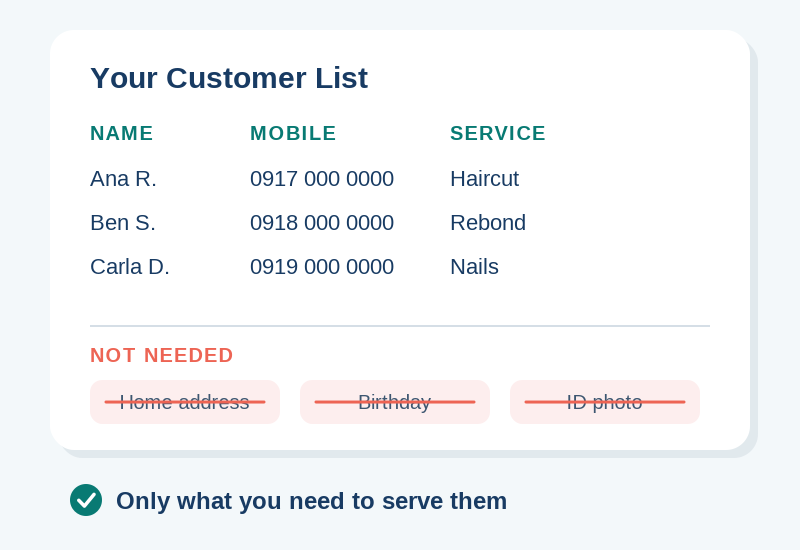
- A salon needs a name and a number to confirm bookings. It doesn't need a home address.
- A delivery order needs an address and a contact number. It doesn't need a birthday.
- A gym may need an emergency contact. It probably doesn't need a photo of a government ID.
If you rent out items and do need an ID, consider just looking at it and writing down the ID type and number, instead of keeping a photo. If you must keep a copy, write on it what it's for, like "For camera rental only, Oct 30."
Decide who can see it
Not everyone on your team needs to see everything.
- Keep the list in one place. One notebook or one shared file is easier to protect than five copies on five phones.
- Lock your phone and laptop. Use a PIN or fingerprint. A lost phone with no lock is an open customer list.
- Give staff only what they need. A rider needs today's addresses, not your full customer list.
- Remove access when someone leaves. If a staff member quits, take them off your page, your shared files and any group chats with customer details.
- Turn on two-factor authentication on your Facebook account and your email, so a stolen password isn't enough to get in.
Don't post receipts and screenshots with names
This is the most common mistake on Facebook business pages. Owners post payment screenshots, delivery waybills or order lists as "proof" that they're legit, or to thank customers.
Those images often show full names, phone numbers, addresses and reference numbers. Once posted, anyone can save them.
If you want to show that people trust you, there are safer ways:
- Cover every name, number, address and reference number before posting. Use a solid block, not a light blur, which can sometimes be read.
- Post a photo of the packed order without the label showing.
- Share a review the customer wrote themselves, with their permission.
The same goes for group chats. Don't forward a customer's details to a group unless everyone in it needs them.
Delete what you no longer need
Old information is a risk with no benefit. A screenshot of a delivery address from two years ago is not helping your business.
Set a simple habit:
- Once a month, clear old payment screenshots and address photos from your gallery after the order is done and recorded.
- After a rental is returned, delete or return the ID copy.
- Once a year, go through your customer list and remove people who asked to be removed or who you no longer serve.
When you delete, check your phone's "Recently deleted" folder and your cloud backup too. Throw away paper records by tearing or shredding them, not by tossing them in the trash whole.
Know that the law covers this too
In the Philippines, personal information is protected by the Data Privacy Act of 2012, also called Republic Act 10173. The law covers businesses that collect and use people's personal information, not only big companies, and it set up the National Privacy Commission (NPC) to enforce it.
The general ideas behind the law match the steps above: be clear about why you collect information, collect only what you need, keep it secure, and don't keep it longer than necessary.
This post is not legal advice. Some businesses, like clinics that handle health records, may have more rules to follow. If you're unsure what applies to you, check the NPC's website at privacy.gov.ph or contact them directly.
A safer place to take inquiries
When customers send their details through a long Messenger thread, the information ends up scattered across chats and screenshots. A simple website can show your services and prices up front and take booking or order requests in one place, so you only ask for the details you need.
DotCity builds a website from the Facebook page you already have. You get a free preview within 48 hours, and your first month is free. After that, the Standard plan is ₱1,499 a month, with no setup fee. Hosting and updates are included, and you can pay by GCash.
- Message us on Messenger for a free preview: https://m.me/dotcity.ph
- Or try our free audit to see what to fix first: https://dotcity.ph/audit