
Why Facebook Recommendations Matter, and How to Get More
Someone in Mandaue is looking for a barber. A friend tags your shop in a comment. They tap your page, and the first thing they check, before your photos or your prices, is what other people say about you.
If your page shows a long list of recommendations, they message you. If it shows two, or nothing at all, they might try the next name in the comments.
Here is how Facebook recommendations work today, and how to get more of them without being pushy.
How Facebook recommendations work
Facebook used to let people rate a page from one to five stars. Now, when someone leaves a review on a business page, Facebook asks: do they recommend this business, yes or no?
After choosing yes or no, the person can add a short written review and photos. Their recommendation then appears in the Reviews section of your page. Once a page has enough reviews, Facebook also shows an overall score near the top, based on those answers.
A few things are good to know:
- You can't delete a recommendation, even a negative one. You can reply to it, and you can report one that is fake, spam, or breaks Facebook's rules.
- People can be asked by Facebook itself. Facebook sometimes asks users who have interacted with a page whether they recommend it.
- Reviews have to be turned on. If your page doesn't show a Reviews section, the setting may be off.
Check that reviews are turned on
Open your page as the admin and go to its settings. Look for the option that lets other people view and leave reviews on your page. On many pages it sits under the privacy settings, in the part about the page and tagging. Facebook moves menus around from time to time, so if you can't find it, search the settings for "reviews."
Turn it on, then ask a friend to check that the Reviews section shows up.
Some owners turn reviews off because they fear one bad comment. But a page with many good recommendations and one fair complaint looks real. A page with no reviews makes people wonder why.
Get your direct link
Customers often can't find where to leave a recommendation, so send them straight there.
Go to your page, open the Reviews section, and copy the link. Save it in your phone's notes so you can paste it quickly.
If your page has a short username, like facebook.com/yoursalon, the link is easier to type and to print on a small card. If it doesn't have one yet, you can set one for free in your page settings.
Ask at the end of the conversation, not the start
Most of your customers already talk to you on Messenger. That chat is the best place to ask, because they are one tap away from your page.
The right moment depends on your business:
- A cake or food seller: the day after delivery, when they have eaten it and shared it.
- An aircon cleaning service: after the job, when the customer has felt the cold air again.
- A gym: after a member's first month, when they have seen some progress.
- A clinic: after a follow-up message checking how the patient is doing.
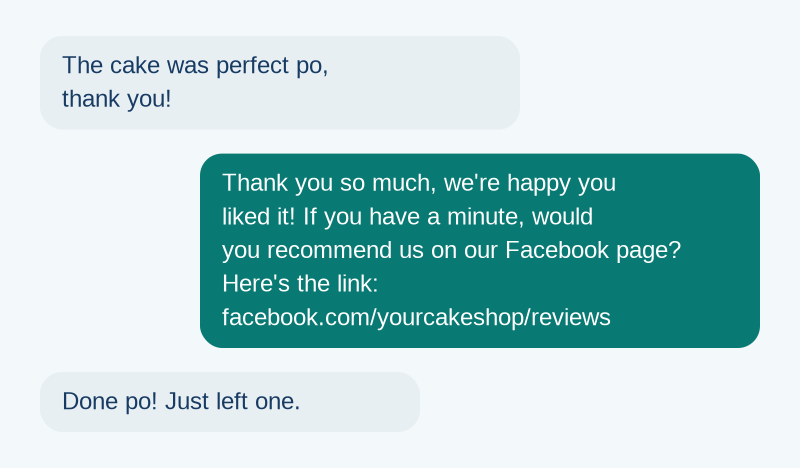
When a customer sends a happy message, such as "Ang sarap po, thank you!", thank them first, then ask:
"Thank you so much, we're happy you liked it! If you have a minute, would you recommend us on our Facebook page? It helps other customers find us. Here's the link: [your link]"
That's all. One message, one link, no pressure.
Turn happy comments into recommendations
Customers often say nice things in places that don't count as recommendations: a comment on your post, or a story where they tag you. When you see one, reply with thanks and gently mention the Reviews section:
"Salamat, Ana! If you'd like, you can also leave a recommendation on our page so others can see it."
Don't copy their words into a fake review or post it for them. A recommendation has to come from the customer's own account.
Don't buy or trade for recommendations
Don't ask friends to post, offer a freebie, or join a "review exchange" group with other sellers.
Fake or traded reviews break Facebook's rules, and they are often easy to spot. Ten glowing reviews from people in another province, all posted on the same day, make customers trust you less. Real recommendations grow slower, but they are the only ones that help over time.
Reply to every recommendation
When someone recommends your page, reply. A short, personal thank-you is enough:
"Thank you, Mark! Glad your aircon is running cold again. See you on your next cleaning."
Replying shows future customers that a real person runs the page.
If someone says no, stay calm. Thank them for the feedback, apologize for their experience, and invite them to message you privately so you can fix it. Keep your public reply short and polite. How you handle a complaint often matters more than the complaint itself.
Make it a weekly habit
Pick one time each week, maybe Monday morning, to:
- scroll through last week's happy chats and send the link to anyone you didn't ask yet
- reply to any new recommendations
- check that the Reviews section still shows on your page
With Christmas orders and bookings picking up, you will have more happy customers than usual. A habit started this week can bring in steady recommendations by the end of the year.
Show your recommendations beyond Facebook
Recommendations help most when people can see them, and not everyone who looks for you is on your Facebook page. A website can show your best customer words next to your services, prices and hours, with a link back to your page so visitors can read more.
DotCity builds a website from the Facebook page you already have. You get a free preview within 48 hours, and your first month is free. After that, the Standard plan is ₱1,499 a month, with no setup fee. Hosting and updates are included, and you can pay by GCash.
- Message us on Messenger for a free preview: https://m.me/dotcity.ph
- Or try our free audit to see what to fix first: https://dotcity.ph/audit