
'HM Po?' Answering Price Questions Without Losing the Sale
You post a photo of a new bag, a cake design or a hair color. The comments fill up fast. "HM po?" "How much?" "Price pls." You reply to each one the same way: "PM sent."
Then you check your inbox. Some people never opened your message. Others read it and didn't reply. A few already bought somewhere else, from a seller who just told them the price.
"How much?" is one of the most common messages a small business gets. It is also one of the easiest to lose. Here is how to answer it so more of those people become customers.
Why "PM sent" can cost you sales
Sellers use "PM sent" for many reasons. Some don't want competitors to see their prices. Some want to start a private chat. Some just got used to it.
But from the customer's side, it adds a step. They have to open Messenger, find your message, and maybe check their message requests, because a message from a page they haven't chatted with may not show up in their main inbox. Many people won't bother.
There are also the people you never see. For every person who comments "HM?", others look at the same post, wonder about the price, and scroll away without asking. When the price is right there, they can decide on the spot.
Know the rule on posting prices
There is also a legal reason to show your prices. The Department of Trade and Industry (DTI) has reminded online sellers that the price tag rule under the Consumer Act applies to them too. In 2022, it said sellers should show prices for their products and not make buyers ask through private messages, and it warned that sellers who don't can face penalties.
So the safest habit is simple: put the price in the post. If you're not sure how the rule applies to your kind of business, ask your local DTI office.
Put the price in the post first
The best answer to "How much?" is one the customer doesn't have to ask for.
- For products, write the price in the caption: "Crossbody bag, ₱450. Black, beige and brown."
- For services, post a price list and pin it to the top of your page: "Haircut ₱200. Rebond from ₱1,500."
- For food, put the price on the menu photo itself, so it stays with the photo when people share it.
You will still get "HM?" comments, because some people don't read captions. That's fine. Now your reply can be quick and friendly.
Answer with the price and the next step
When someone asks, answer where they asked. If they asked in the comments, reply in the comments. Others reading the post get the answer too, and the customer doesn't have to go looking for it.
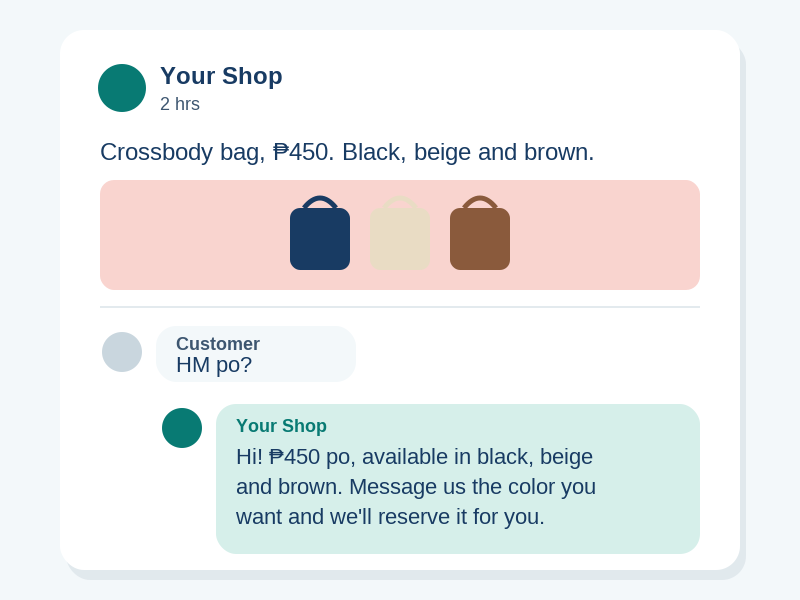
A good reply has two parts: the price, and what to do next.
"Hi! ₱450 po, available in black, beige and brown. Message us the color you want and we'll reserve it for you."
The next step is what turns a question into an order. Without it, the customer knows the price but doesn't know what to do with it.
If you need private details, like their address or the date of their event, it's fine to move the chat to Messenger. Just give the price publicly first, then invite them in: "₱1,200 for the 8-inch. Message us your date so we can check if we have a slot."
Give a range for custom work
Some prices really do depend on the job. A haircut and color depends on hair length. Aircon cleaning depends on the type of unit. A custom cake depends on the size and design.
You can still give a useful answer. Give a range or a starting price, and say what changes it.
- "Hair color starts at ₱1,200 for short hair. Long hair is ₱1,800 to ₱2,500."
- "Aircon cleaning is ₱600 for a window type and ₱1,200 for a split type."
- "Custom cakes start at ₱1,500. The final price depends on the size and design."
A range helps people decide if you fit their budget. The ones who reply are already okay with the price, which saves you both time.
End with a question
The worst reply is a price and nothing else. The chat ends there.
Add one short question that helps them move forward:
- "What date do you need it?"
- "Is this for pickup or delivery?"
- "What time works for you this week?"
- "Short, medium or long hair?"
A question is easy to answer, and once they answer, you are talking about the order instead of the price.
Save your replies
You will answer the same price questions many times a week. Write your best answers once and save them as saved replies in your page's inbox. Then you can answer in seconds, even on a busy day, and every customer gets the same clear information.
Keep a short list: one reply per main product or service, each with the price, the options and the next step.
Follow up once
If someone asked the price and went quiet, it's okay to send one gentle follow-up a day or two later:
"Hi! Just checking if you're still interested in the black bag. We have 2 left."
One follow-up is helpful. Three is pushy. If they don't reply after one, let it go.
Let customers see prices before they ask
The easiest "How much?" to answer is the one that never comes. A simple website can show your full price list, your options and how to order on one page that doesn't get buried, so customers can check prices any time and message you when they're ready to buy.
DotCity builds a website from the Facebook page you already have. You get a free preview within 48 hours, and your first month is free. After that, the Standard plan is ₱1,499 a month, with no setup fee. Hosting and updates are included, and you can pay by GCash.
- Message us on Messenger for a free preview: https://m.me/dotcity.ph
- Or try our free audit to see what to fix first: https://dotcity.ph/audit